NXP and ARROW introduce the SCM-i.MX 6D/Q|NXP:
Single Chip System Modules for IOT
'via Blog this'
Monday, April 17, 2017

Thursday, April 13, 2017
OrCAD Capture Cloud | OrCAD
OrCAD Capture Cloud | OrCAD:
Free OrCAD Schematic Capture - Cloud Based
Sponsored by Arrow
'via Blog this'
Free OrCAD Schematic Capture - Cloud Based
Sponsored by Arrow
'via Blog this'
Wednesday, March 29, 2017

Thursday, March 16, 2017
GC-Prevue - Align Layers
GC-Prevue is my favorite Gerber Viewer.
To align layers select a pad or feature that exists on both layers. Select all objects on the layer that is to be moved. Place the cursor near a pad, press S (select) key to center on the pad then press the Z (zero) key. Press space bar to move (unlock) crosshair. On the other layer place the cursor near the same pad, select S key, then O (offset) key, then OK to align the layers.
select edit mode (press e key) for the layer the is to be move
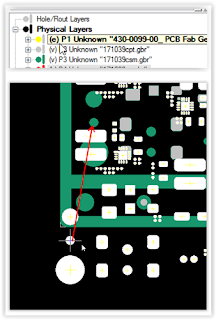
Thats it !
To align layers select a pad or feature that exists on both layers. Select all objects on the layer that is to be moved. Place the cursor near a pad, press S (select) key to center on the pad then press the Z (zero) key. Press space bar to move (unlock) crosshair. On the other layer place the cursor near the same pad, select S key, then O (offset) key, then OK to align the layers.
select edit mode (press e key) for the layer the is to be move

Thats it !
Saturday, March 11, 2017

Subscribe to:
Posts (Atom)